

Download SearchWith – Firefox Add-on, Search Tool, Instant Search, Productivity Utility
Overview
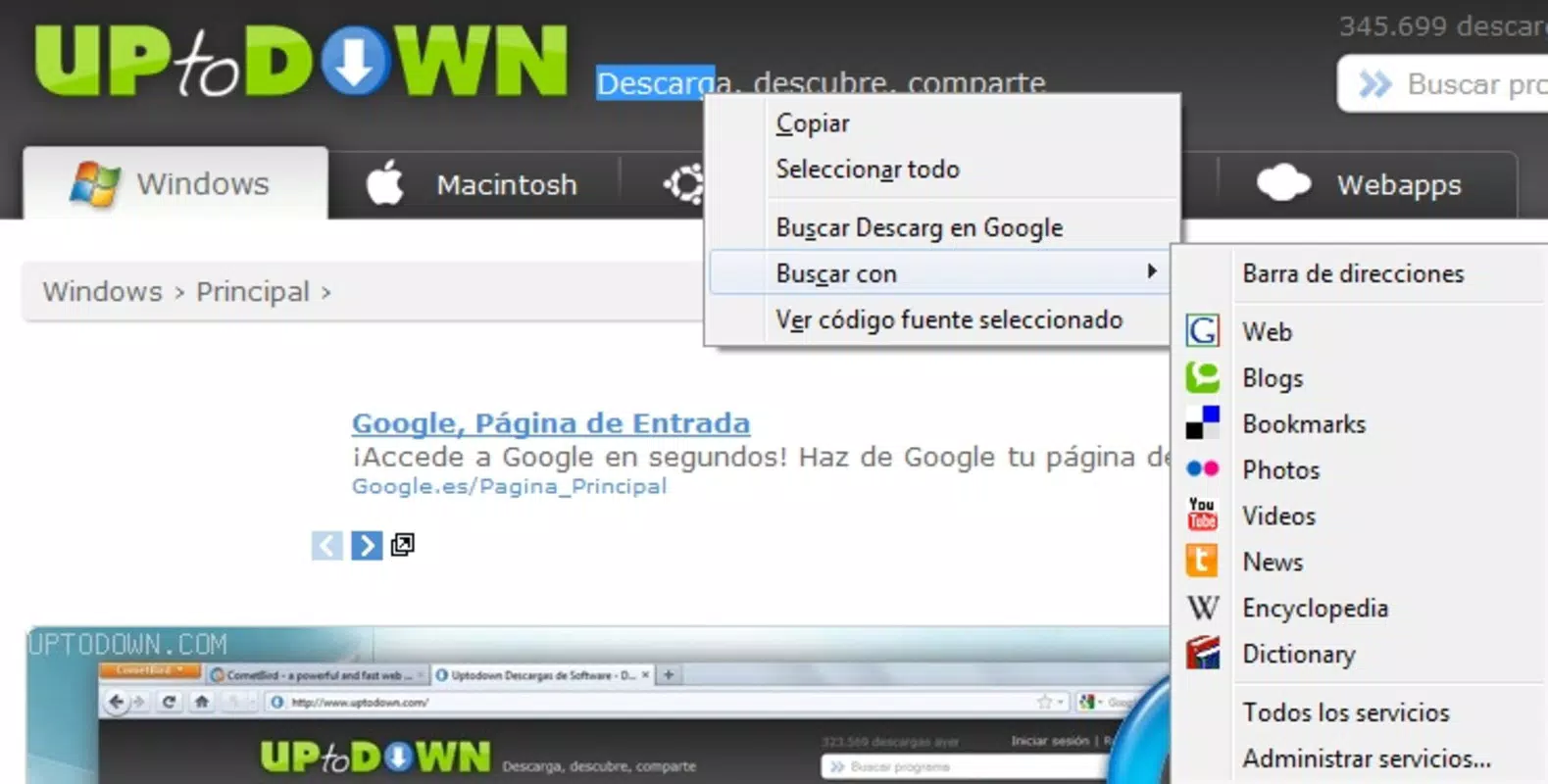
SearchWith is a productivity-enhancing add-on designed for the Firefox browser, aimed at streamlining the process of searching for specific words or phrases found on websites. By enabling users to initiate searches with a simple right-click, the tool eliminates the need to manually copy and paste text into a search engine. This functionality is particularly valuable for researchers, students, and professionals who frequently access reference materials, definitions, or multimedia content while browsing. The app addresses a common inefficiency in digital workflows—navigating between pages and manually entering search queries—by providing instant access to relevant results from platforms such as Google, Wikipedia, and YouTube.
Target users include individuals seeking to improve their online research speed and accuracy. Whether verifying a term’s definition, exploring related video content, or finding scholarly references, SearchWith enhances the browsing experience through seamless integration. While the developer did not provide additional background information, the tool has been available since 2010, indicating a long-standing presence in the Firefox ecosystem. Its continued relevance suggests a stable and functional design that meets core user needs without unnecessary complexity.
Real-world use cases include academic research, content creation, language learning, and general web exploration. The tool’s ability to connect directly with multiple platforms makes it a versatile utility within a digital workflow. In the broader context of browser tools, SearchWith fills a niche for lightweight, efficient search automation, offering a focused solution without the bloat of full-featured extensions.
Key Features & Functionality
- Instant Search Options: Right-click any word on a webpage to instantly access search results from multiple platforms. This feature enables rapid information retrieval without interrupting the user’s workflow.
- Multiple Search Platforms: Supports searches across Google, Wikipedia, YouTube, Flickr, and dictionaries, allowing users to tailor their search to the type of content they need—whether textual, visual, or video-based.
- User-Friendly Interface: Integrates directly into Firefox’s context menu with no complex setup required. The minimalistic design ensures that users can perform searches without learning new controls.
- Mouse Gesture Support: Offers an advanced option for users who prefer gesture-based navigation. For example, a specific mouse movement can trigger a YouTube search, ideal for quickly finding related videos.
- Customizable Settings: Allows users to prioritize preferred search engines or platforms, ensuring the tool adapts to individual browsing habits and preferences.
For instance, a student reading an article on climate change could right-click the term “carbon sequestration” and instantly open a Wikipedia page or a YouTube explanation. Similarly, a content creator might use the tool to find relevant images on Flickr or video clips on YouTube by clicking on descriptive keywords. These real-world applications demonstrate how SearchWith enhances efficiency and reduces friction in digital research tasks.
Interface, UX & Performance
SearchWith maintains a clean and unobtrusive interface by leveraging Firefox’s built-in context menu. There is no additional panel, popup, or dashboard to manage—users simply right-click a word and select a search option. The navigation flow is intuitive and consistent with standard browser interactions, minimizing the learning curve for new users.
The visual style aligns with Firefox’s default design language, ensuring visual harmony and avoiding distractions. The tool does not introduce additional animations or transitions, which contributes to its lightweight nature and fast response time. Although the developer did not list formal performance metrics, the minimal resource usage suggests stable performance across different device categories, including older or low-end systems.
Responsiveness is immediate—search options appear almost instantaneously after a right-click. Stability is maintained through consistent integration with the browser’s architecture, reducing the risk of crashes or conflicts. The lack of persistent UI elements also means fewer opportunities for interface glitches. Overall, the user experience is optimized for speed and simplicity, making SearchWith a reliable companion for daily browsing.
Platform Compatibility & Technical Requirements
SearchWith is designed exclusively for the Firefox browser. The developer did not specify minimum OS requirements or file size. Compatibility information was not fully disclosed, so users should ensure their Firefox version is up to date to avoid potential issues. The tool operates as a browser add-on and does not require a standalone mobile or desktop application.
Given its nature as a Firefox extension, it is not available on mobile platforms such as Android or iOS. The technical requirements are inherently tied to the browser environment, meaning installation is managed through Firefox’s add-on manager. No additional permissions beyond standard browser access are required, though specific permissions were not listed.
Pros and Cons
Pros
- Efficient right-click search functionality reduces time spent on manual input.
- Supports multiple platforms, including Google, Wikipedia, YouTube, and dictionaries.
- Minimalist interface with no disruptive popups or dashboards.
- Customizable settings to prioritize preferred search engines.
- Mouse gesture support enhances efficiency for advanced users.
Cons
- Not available as a mobile app or standalone tool.
- Specific technical requirements were not disclosed.
- Dependent on Firefox browser—no compatibility with other browsers.
- Developer background and support details were not provided.
- Limited to desktop use; no functionality on smartphones or tablets.
FAQ
Is SearchWith available for mobile browsers?
SearchWith is a Firefox add-on and is not available for mobile platforms such as Android or iOS. It only functions within the Firefox desktop browser.
Can I use SearchWith with browsers other than Firefox?
No, SearchWith is specifically designed for Firefox. It is not compatible with Chrome, Safari, Edge, or other web browsers.
How do I install SearchWith?
You can install SearchWith by visiting the Firefox Add-ons website, searching for the extension, and clicking “Add to Firefox.” The installation process is quick and does not require administrative privileges.
Is SearchWith secure to use?
As a Firefox add-on, SearchWith operates within the browser’s security model. It does not collect personal data or track user behavior. However, always ensure you install extensions only from official sources.
Does SearchWith require updates?
Yes, like all browser extensions, SearchWith may require updates to maintain compatibility with new Firefox versions. Users should keep the add-on updated through the Firefox Add-ons manager.
Final Thoughts
SearchWith stands out as a focused, efficient tool for users who value speed and simplicity in their online research. Its ability to deliver instant search results with a single right-click significantly enhances productivity, especially in academic, professional, and creative workflows. While it is limited to Firefox and desktop use, its lightweight design and seamless integration make it a reliable choice for anyone seeking to reduce friction in their browsing experience.
For researchers, students, and knowledge seekers, the tool offers a practical way to explore information across multiple platforms without leaving the current webpage. Its customizable settings and support for diverse search sources add flexibility without complexity. Although it lacks mobile support and detailed technical documentation, its core functionality remains robust and effective.
Download SearchWith now to transform the way you search online—effortlessly, instantly, and securely.


